Remove Lssr Ransomware
File-encryption Trojans continue to be one of the biggest threats to your online safety. The most dangerous thing about these threats is that recovering from their attacks is often an impossible task. This is because they work by encrypting files and then extorting you for money. Unfortunately, reversing the encryption they use is not easy. For example, the STOP/Djvu Ransomware family is one of the most notable ones at the moment, and its variants are impossible to decrypt. Today's topic of discussion is the latest STOP variant, called Lssr Ransomware. Other STOP variants include the Zqqw Ransomware.
The Lssr Ransomware payload is spread on the Internet via all sorts of shady content. It may reside in a software activator or game crack, a pirated movie, or even in a harmless-looking email attachment. While it is possible to avoid dangerous files by only browsing legitimate and trustworthy sites, we advise you to rely on professional protection as well. You can use an anti-malware software suite to keep your system safe from threats like the Lssr Ransomware.
If you fail to stop the Lssr Ransomware attack, the file-locker will encrypt a wide range of file types – documents, media, archives, databases, and even backups. Since this is a more elaborate ransomware project, it performs additional actions to worsen the victim's situation. It will delete Shadow Volume Copies and System Restore Points, therefore making recovery even more difficult. The consequences of Lssr Ransomware's attack are noticeable immediately. Files that the threat locks will have the '.lssr' extension added to their name, and the ransom document '_readme.txt' will be available on the desktop.
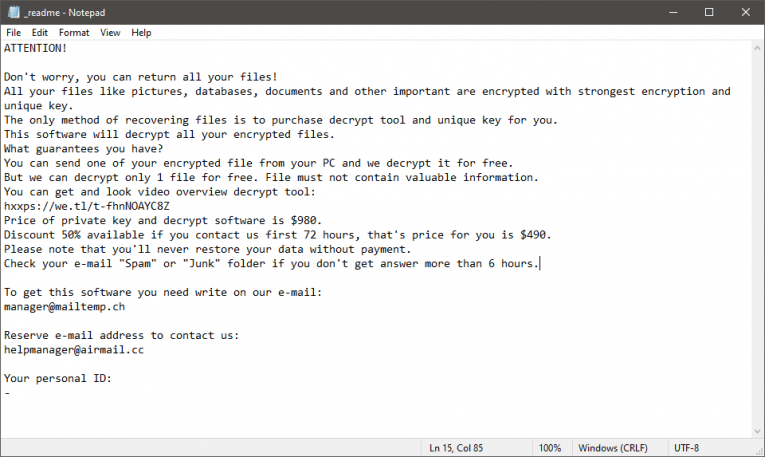
The criminals ask for a ransom payment of $490, and they advise the victim to message them at manager@mailtemp.ch or helpmanager@airmail.cc. They also offer to unlock 1-2 files for free – make use of his offer. However, we assure you that you should not accept to pay the ransom sum. The crooks might try to extort you for money without giving you anything in return. Our advice is to use an antivirus tool to eliminate the threat, and then try out other data recovery tools.